

Morning scan EA that enters at midnight [eagle blizzard]

① Be sure to change the magic number for each currency pair.
②If you are using a home PC, be sure to disable sleep mode!
One-position type morning scalping EA that enters at 0:00 MT5 hours(Developed: 2020)
[Used time frame] 1 hour time frame
[Recommended lot for margin]
→ 0.01 lot of each currency for 10,000 yen margin
CurrentlyAxi , TitanFX, MakeCapital We distribute IB via the following.
[eagle blizzard] Recommended currency pairs (13)
・euraud
・audnzd
・audcad
・eurnzd
・eurcad
・gbpaud
・gbpcad
・gbpnzd
・eurchf
・gbpchf
・nzdchf
・chfjpy
・nzdcad
Eagle Blizzard Titan
Backtest List
Titan FX Account Real Forward Results
There is a track record of real forwards from 2023 onwards, and the results have been stable.
RealTrade (2023/5/1~)
eagle blizzard ____TI TAN MT5 – hiro FX youtuber's MT5 (real-trade.tech)

Eagle Blizzard MT5 detailed video

What we are releasing to you now is Titan FX.XM , MyFxMarkets , Axi , TitanFX にて配布をしております。のMT5で利用可能です!
[Eagle Blizzard Titan] How to register for IB-EA
①Titan,XM,MakeCapital,Axiから口座開設し、②へ進んで下さい😌
TitanFX
https://partners.titanfx.com/registration/ref?cp=RDL1WJVJ6D494
→Open a new account or an additional account from the link above.
・Referral number [8300193] must be entered.
・MT4Standard Account choice.
Make Capitalの場合
https://portal.makecapital.com/login/register?code=48321
→ Open a new account via the link above
The account type isMT4 STD口座 choice.
For Axi
https://www.axi.com/asiapartners/live-account?promocode=4486146
→Open a new account or an additional account from the link above.
・MT4Standard Account choice.
・Leverage 1000 choice.
② https://page.line.me/751aarqg
→Register for the official LINE account via the link above.
③After we have checked your account, if there are no problems, deposit more than 100,000 yen.
→各13通貨ペア利用の場合、推奨証拠金10万円で各0.1ロットとなります。
④EA Download LinkDownload the EA from here, and paste the EA itself into the Experts folder and webauth5_hiro.ex5 into the Libraries folder.
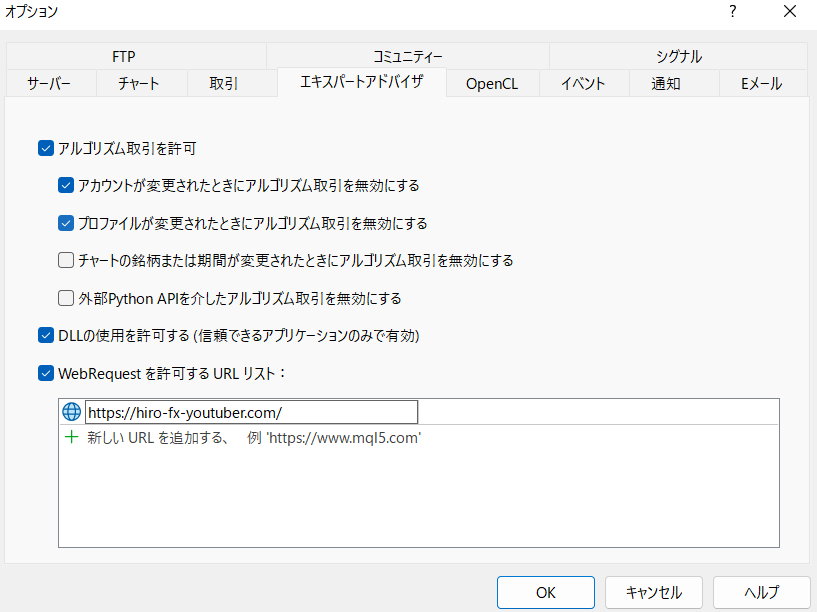
⑤"WebRequest"Configure settings (first time only)
→MT5 top"Tools" → "Options"→"Expert Advisors" →
"Allow use of DLLs"and"Allow WebRequest"Check the box and add it to the URL list.
"https://hiro-fx-youtuber.com/"(Web account authentication)
⑥Install the EA on each chart!